



Why Use a CompactFlash Card Reader
CompactFlash card readers are essential tools for photographers who want to quickly transfer images and video files from their CompactFlash (CF) cards to computers. Whether you're working with professional-grade storage or archiving legacy media, a reliable card reader makes the workflow faster and protects your cards from wear. At Samy's Camera, we stock CompactFlash readers from leading brands that deliver consistent performance.
CompactFlash cards remain popular in certain photography and video workflows, particularly with older professional cameras and cinema equipment. Direct card-to-computer transfer via a dedicated reader is faster than using a camera's USB connection, reduces power consumption, and extends the life of your camera's battery and USB port. Readers also provide a straightforward way to manage multiple cards simultaneously, which is critical during high-volume shoots or when archiving historical footage.
Key Features of CompactFlash Readers
Modern CompactFlash readers combine fast data transfer speeds with convenient connectivity options. Most current models feature USB 3.0 or USB-C connections, enabling transfer rates suitable for video workflows. Multiple models support multi-card configurations, allowing you to read CompactFlash cards alongside other storage formats.
- USB 3.0 high-speed connections
- USB-C ports for modern computers and tablets
- Multi-card compatibility for flexible workflows
- Compact, portable designs for on-location work
- Support for legacy and contemporary storage formats
- Plug-and-play operation with minimal driver requirements
CompactFlash Reader Brands at Samy's Camera
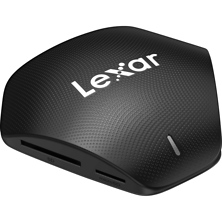
We carry CompactFlash readers from Lexar and SanDisk, two manufacturers with decades of storage technology expertise. Lexar readers are known for reliability and professional-grade performance, while SanDisk offers both standard and professional-grade options designed for different user needs. SanDisk Professional models include advanced features like dual-card support and higher throughput for users handling large video files.
Connection Types: USB 3.0 vs. USB-C
USB 3.0 readers remain the standard across most CompactFlash models, delivering transfer speeds up to 5 Gbps, which is sufficient for importing high-resolution photos and video files. USB-C models provide forward compatibility with newer computers and tablets, with speeds matching or exceeding USB 3.0 performance. Choose USB-C if your primary computer has USB-C ports, or if you frequently use video & audio equipment or mobile devices for file review and backup.
Workflow Advantages for Different Photographers
Dedicated CompactFlash readers address specific workflow needs depending on your gear and habits.
Professional Video Workflows
Cinema professionals and broadcasters who work with CompactFlash-based digital cinema cameras benefit from the speed and multi-card capability of professional-grade readers. During long shoots, having a dedicated reader allows you to offload footage to external SSDs while simultaneously reviewing and backing up media. Professional SanDisk models are built for this sustained throughput.
Legacy Equipment Operators
Photographers with older Canon cameras, Nikon systems, or professional Sony cameras that used CompactFlash continue to rely on stable, dependable readers for archiving and ongoing work. Readers are often faster and more convenient than using the camera's own USB connection, especially when managing multiple cards from a single shoot.
Archive and Media Management
Those maintaining historical photo archives or migrating CompactFlash media to modern storage benefit from readers that ensure safe, fast transfers without requiring camera access. This is especially valuable for studios managing decades of legacy media.
Choosing the Right CompactFlash Reader
Selection depends on your current connectivity options and workflow speed requirements. If your computer has USB 3.0 ports and speed is your priority, a USB 3.0 reader is a proven, reliable choice. If you are transitioning to USB-C, or want forward compatibility with tablets and newer laptops, consider a USB-C model. For users handling video or multiple concurrent transfers, professional-grade readers with higher sustained throughput are worth the investment.
All readers at Samy's Camera are backed by manufacturer support and compatibility documentation. Verify that the specific reader model supports your CompactFlash variant (standard CF or UDMA CF) before purchasing, though modern readers generally support all CF types. Store your readers safely with appropriate camera accessories and cases when not in use.
Frequently Asked Questions
What is the difference between a CompactFlash reader and using my camera's USB port?
A dedicated card reader typically offers faster transfer speeds, reduces strain on your camera's USB port and battery, and allows you to continue reviewing or transferring files from one card while shooting with another. Readers are particularly valuable if you use multiple cards during a session.
Do CompactFlash readers work with all computer operating systems?
Yes. CompactFlash readers are standard storage devices that work with Windows, macOS, and Linux without specialized drivers. Simply plug in the reader, insert your card, and your operating system recognizes it as an external storage device.
Are USB-C readers compatible with older computers?
Most USB-C readers work with USB 3.0 ports via passive USB-C-to-USB-A adapters, though this may reduce transfer speeds. If your primary computer lacks USB-C, consider a USB 3.0 reader instead. Adapters are affordable but add an extra cable to your setup.
Can I use a multi-card reader for just CompactFlash cards?
Yes. Multi-card readers accept CompactFlash cards and work perfectly if you only insert CF media. Multi-card capability is useful if you also shoot with other formats or manage cards from different sources, but single-format readers are also available.
How fast are CompactFlash transfer speeds?
USB 3.0 readers deliver theoretical maximum speeds of 5 Gbps. Real-world transfer rates depend on your card's speed rating and computer speed, but modern CompactFlash cards typically transfer at 100-150 MB/s, making a full card transfer a matter of minutes.
Is a CompactFlash reader essential, or can I use my camera?
Not essential if you only shoot one or two cards per session, but highly recommended if you handle multiple cards, work in challenging environments where card wear is a concern, or need to maximize transfer speed during time-sensitive workflows.
Shop CompactFlash Readers at Samy's Camera
Whether you are maintaining a legacy CompactFlash workflow or archiving media, Samy's Camera has the right card reader for your needs. Browse our selection of Lexar and SanDisk CompactFlash readers, choose your preferred connectivity, and speed up your file transfer process. All readers come with full compatibility details and manufacturer support. Shop now and simplify your digital workflow.