






Why Digitize Your Film Collection
Film scanners bridge the gap between analog and digital photography, allowing you to preserve and share your film images in high-resolution digital format. Whether you're protecting decades of family memories or working with professional slide archives, film scanners transform physical film into accessible digital files.
Film offers timeless image quality, but prints and negatives fade over time and are vulnerable to environmental damage. Digitization creates permanent digital records that resist decay, improve accessibility, and enable sharing without handling originals.
Key Advantages of Film Scanning
- Preserve fading photographs and deteriorating negatives before quality is lost
- Create backup digital copies for long-term archival storage
- Enable printing, sharing, and editing of film images at modern resolutions
- Batch scan multiple slides or negatives to save time on large projects
- Maintain color accuracy and dynamic range from original transparencies
- Digitize Super 8 and 8mm motion picture footage for easy playback
Film Scanner Types and Formats
Different film formats require specialized scanning equipment. Your choice depends on the media you have, the resolution you need, and how many images you'll scan.
35mm Slide and Negative Scanners
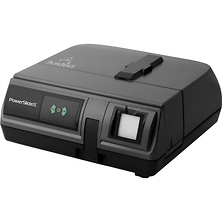
Desktop 35mm scanners are the most common choice for home and professional use. These handle slides in standard mounts and uncut 35mm negatives. Resolution starts at 2400 DPI for basic quality and goes up to 7200 DPI or higher for archive-grade digitization. Consider Leica, Kodak, Pacific Image, and Panasonic for slide and negative scanning solutions.
Medium Format Film Scanners
Medium format film (120 and 220 roll film) captures larger negatives with more detail than 35mm. Dedicated medium format scanners accommodate the wider film width and deliver resolution to reveal fine grain structure and tonal gradation.
Automatic Slide Feeder Scanners
For large collections, automatic feeder models load 50-150 slides at once and scan unattended. These significantly reduce time on batch projects but typically cost more than manual scanners. Ideal if you have hundreds or thousands of slides to process.
Motion Picture Film Digitizers
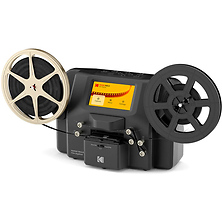
Super 8 and 8mm film requires specialized conversion equipment. Kodak and similar brands offer digitizers that play and record motion picture film to digital video formats for modern playback and editing.
Resolution and DPI Considerations
Resolution determines how much detail your digital file captures. Higher DPI settings preserve more information but take longer to scan and create larger files.
- 2400 DPI: Standard quality for everyday photos and 4x6 or 8x10 prints
- 3200-4000 DPI: Archive quality for 35mm with fine detail visible in larger prints
- 5400 DPI and higher: Professional archival standard revealing grain structure and maximum detail
Consider your intended use when selecting resolution. Web sharing and standard prints require less than archival projects. Large print work benefits from maximum resolution to future-proof your digitized collection.
Software and Workflow Features
Modern film scanners include software for color correction, dust and scratch removal, and batch processing. Look for automatic exposure correction on underexposed negatives and batch scanning to process multiple frames without manual intervention.
Some scanners integrate dust reduction technology. Others require manual cleaning of film before scanning. Manual inspection and cleaning generally yields cleaner digital files.
Digital Output and Storage
Scanned files typically export as TIFF (lossless) or JPEG (compressed). TIFF preserves maximum quality for archival storage and editing. JPEG offers smaller files and faster processing for sharing. Many photographers scan at TIFF for archive, then create JPEG versions for distribution.
Scanner Speed and Capacity
Scanning speed varies based on resolution, film type, and scanner model. Single-frame scanners process slides at 2-5 minutes per frame at 4000 DPI. Automatic feeder models reduce per-frame time on batch projects by eliminating manual loading between scans.
Who Uses Film Scanners?
Photographers Digitizing Archives
Professional photographers with decades of film cameras work need reliable scanning to convert film portfolios into digital formats. Archive-grade resolution at 4000+ DPI reveals the detail of original film negatives and transparencies.
Family Historians and Genealogists
Preserving aging family photographs protects memories before prints and slides deteriorate. Batch scanning meets the needs of genealogy projects and family archive sharing. Proper storage solutions protect digitized files long-term.
Collectors and Restorers
Antique and vintage film collections require careful handling and specialized scanning. Quality equipment preserves cultural and historical significance of rare original slides.
Fine Art and Gallery Work
Artists and galleries documenting film-based work need professional-grade scanning to produce exhibition-quality digital files. Slide and negative archives benefit from maximum resolution and color accuracy.
Film Care Before Scanning
Proper film preparation improves scan quality and protects your scanner from debris. Clean slides and negatives before scanning to reduce dust removal work afterward. Inspect film for mold, brittleness, or deterioration that might require professional conservation.
Store film in stable temperature and humidity conditions while preparing for scanning. Avoid rapid temperature swings that cause condensation and damage. Quality storage solutions maintain optimal conditions.
Common Film Scanning Questions
What DPI should I scan my slides at?
For 35mm slides intended for 8x10 prints or larger, scan at 4000 DPI minimum. For web sharing or standard prints, 2400 DPI is sufficient. Medium format film benefits from at least 2400 DPI given its larger negative size.
Can I scan slides without a computer?
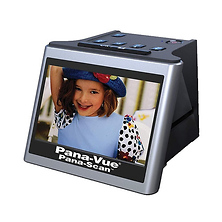
Some scanners feature built-in displays and storage, allowing viewing without connecting to a computer. These offer convenience but typically sacrifice resolution or advanced color correction compared to computer-connected scanners.
How long does it take to scan a slide collection?
A single 35mm slide scans in 2-10 minutes at high resolution. A collection of 100 slides takes 3-15 hours of active scanning time. Automatic feeders run unattended on batch loads, reducing total project time.
What file format should I use for archival storage?
TIFF format preserves maximum quality and remains accessible long-term without software dependencies. Store TIFF files as your archival master, then create JPEG versions for sharing.
Can I scan color negatives and black-and-white film?
Yes, quality film scanners handle color negative film, black-and-white negatives, and color slides. Software includes color negative inversion and black-and-white processing profiles.
Are dedicated film scanners better than multifunction printer scanners?
Dedicated film scanners provide superior resolution, color accuracy, and dust reduction for film-specific work. Multifunction scanners offer convenience but sacrifice detail and typically cap at 2400 DPI.
Shop Film Scanning Solutions at Samy's
Preserve your film collection with professional-grade scanning equipment from trusted brands. Browse film scanners, lenses, and digitizing options at Samy's Camera. Our knowledgeable staff can help you choose the right resolution and features for your project. Visit a Samy's location or contact our team to discuss your film digitization needs.