

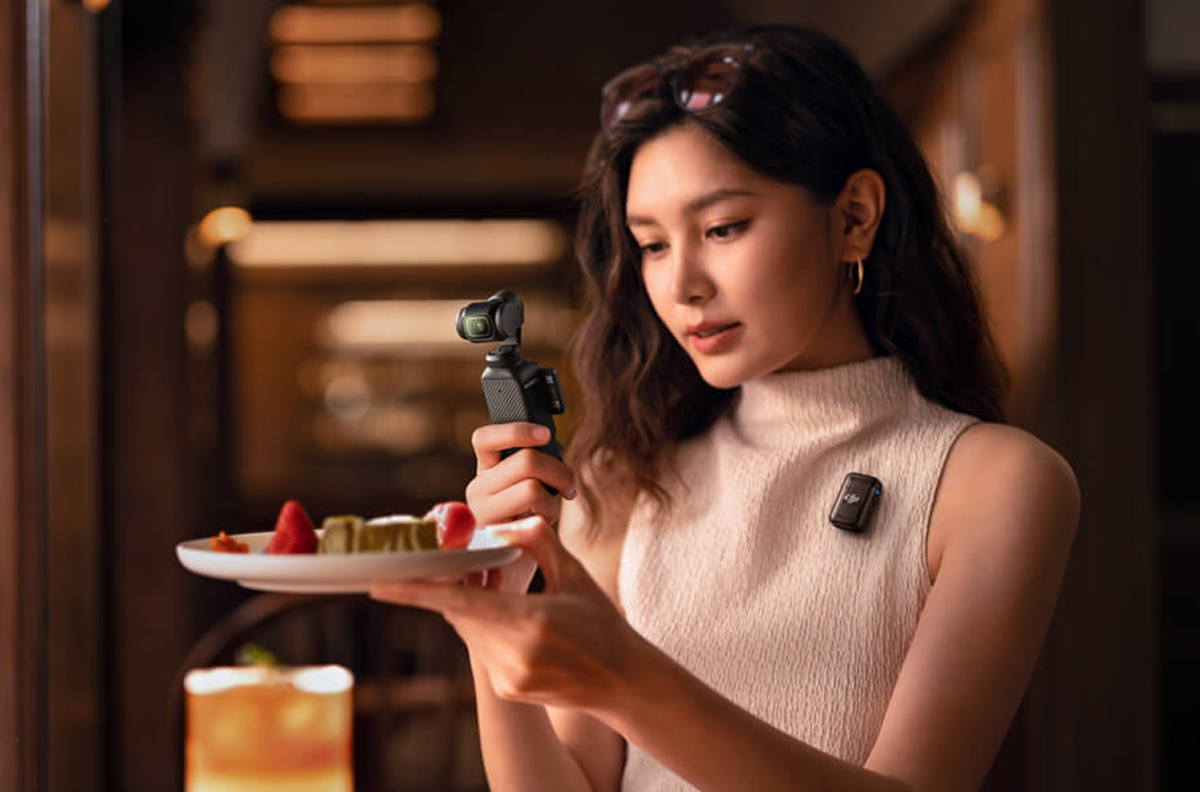
Small enough to fit in a pocket but capable of stabilized 4K video, the DJI Osmo Pocket 3 occupies an interesting space between shooting video with a smartphone and carrying a larger mirrorless camera and gimbal.
Its combination of a 1-inch CMOS sensor, three-axis mechanical gimbal stabilization, 2-inch rotating touchscreen, subject tracking, fast autofocus and compact size makes the Pocket 3 particularly well suited to creators who want good-looking video without carrying a complicated camera setup.
But who is the DJI Osmo Pocket 3 actually for? And once you have one, how should you set it up?
Here's what you need to know.
What Is the DJI Osmo Pocket 3?
The DJI Osmo Pocket 3 is a compact handheld camera built around a 1-inch CMOS sensor and a three-axis mechanical gimbal.
Unlike electronic stabilization that crops or digitally adjusts an image, the Pocket 3 physically stabilizes the camera using its gimbal. That allows you to walk, pan and follow a subject while producing considerably smoother footage than you would normally get from an unstabilized handheld camera.
The camera uses a 20mm-equivalent f/2.0 lens with a minimum focusing distance of 0.2 meters. It can record standard video at up to 4K/60fps and 4K slow-motion footage at up to 120fps. It also supports 10-bit D-Log M and HLG recording for users who want greater flexibility in post-production.
The rotating 2-inch OLED touchscreen can also switch the camera between horizontal and vertical shooting, making the Pocket 3 useful for both traditional widescreen video and social-media content.
Who Is the DJI Osmo Pocket 3 For?
Vloggers and Content Creators
This is probably the most obvious audience.
The small size makes the Pocket 3 easy to hold at arm's length, while ActiveTrack 6.0 includes tools such as Face Auto-Detect and Dynamic Framing to help keep a moving subject in the frame.
That can be especially useful when you're filming yourself and don't have another person operating the camera.
The ability to quickly move between horizontal and vertical shooting also makes it practical for creators producing content for YouTube, Instagram and TikTok.
Travelers
For travel, one of the Pocket 3's biggest advantages is simply its size.
You can carry a camera and mechanical three-axis gimbal in something small enough to fit into a jacket pocket or a compact camera bag.
That makes it useful for walking through a city, filming a vacation, recording food and restaurants, documenting a road trip or capturing everyday moments without carrying a full camera kit.
Family and Everyday Video
You don't need to be a professional creator to benefit from a stabilized camera.
Parents and families can use the Pocket 3 for vacations, birthdays, children's activities and everyday situations where smooth video is desirable but carrying a larger camera isn't.
Full-pixel fast focusing helps the camera acquire and maintain focus on moving subjects.
Solo Creators
The Pocket 3 is particularly useful if you frequently work alone.
ActiveTrack can follow a subject while the camera is positioned on a tripod, and the rotating touchscreen lets you see your framing while you're in front of the lens.
Add a compatible wireless microphone, and a single person can create a remarkably compact video-production setup.
Small Businesses and Social Media Teams
The Pocket 3 can also be a useful tool for businesses that need regular video content but don't necessarily have a dedicated video crew.
It can be used for behind-the-scenes footage, short product demonstrations, interviews, social-media clips and quick-turnaround content.
DJI also includes a Product Showcase mode, which prioritizes focusing on foreground subjects. That is useful when presenting an object close to the camera.
Where the Pocket 3 Fits Alongside a Mirrorless Camera
The Pocket 3 isn't intended to replace every camera.
A mirrorless camera is the tool for interchangeable lenses, longer focal lengths, more extensive manual controls, specialized accessories or a larger camera system built around professional production.
Think of the Pocket 3 as an extremely portable stabilized video camera that you can have with you when a larger setup isn't practical.
For some photographers and filmmakers, that's precisely the appeal: the second camera that gets used is the one that's easy enough to carry everywhere.
How to Set Up the DJI Osmo Pocket 3
If you've just purchased a Pocket 3, there are a few steps worth taking before your first real shoot.
1. Charge the Camera
Start by charging the Pocket 3 with a compatible USB-C charger and the supplied USB-C cable.
DJI states that the internal 1300mAh battery can reach approximately 80% charge in 16 minutes and 100% in 32 minutes when tested with DJI's 65W PD charger under laboratory conditions. Actual charging times can vary.
The Pocket 3 can also be used while connected to external power. According to DJI, while recording it draws power from the external input and resumes charging the internal battery when recording stops.
2. Install a microSD Card
You'll need a compatible microSD card for recording.
The Pocket 3 supports microSD cards up to 1TB. DJI publishes a list of recommended cards, and SanDisk and Lexar both appear on it.
For video cameras, card speed matters. Don't assume that an old microSD card from another device will necessarily be appropriate for high-resolution video recording.
After installing a card, formatting it in the camera before your first important shoot is a good practice.
3. Download DJI Mimo and Activate the Camera
The Pocket 3 requires activation through the DJI Mimo app.
Turn on Wi-Fi and Bluetooth on your phone, power on the Pocket 3 and open DJI Mimo. Select the camera icon in the app and connect to the Pocket 3. DJI Mimo will then guide you through the activation process.
DJI Mimo can also be used for camera control, firmware updates, transferring footage, editing and sharing.
4. Check for Firmware Updates
Once the camera is connected to DJI Mimo, check whether a firmware update is available.
Keeping the firmware current ensures that you're using DJI's latest available fixes and supported camera features.
Do this before an important shoot rather than discovering an update when you're ready to start filming.
5. Start With 4K/30fps
There isn't one correct recording setting for every situation, but 4K/30fps is a practical starting point for general-purpose video.
It provides high-resolution footage while keeping the workflow relatively straightforward.
For a more cinematic look, you may prefer 24fps. For action or footage that you may want to slow down, 60fps can be useful.
The Pocket 3's advertised 4K/120fps capability is specifically a Slow Motion mode.
6. Choose Horizontal or Vertical Video
Decide where the video will ultimately be used.
For YouTube, websites, television or traditional video, horizontal recording will generally make the most sense.
For vertical-first social content, the Pocket 3's rotating screen makes switching orientations particularly easy. DJI describes this as Smart Horizontal-Vertical Shooting.
If you're shooting something important, think about your final destination before you start recording rather than trying to reframe everything later.
7. Learn the Gimbal Modes
The gimbal is one of the biggest reasons to own the Pocket 3, so spend some time learning how it responds to your movements.
Different gimbal behaviors are useful for different shots. A walking shot, a slow pan across a landscape and a shot following a person don't necessarily call for the same movement.
The goal isn't simply to eliminate camera shake. It's to make your camera movement look intentional.
Move smoothly, avoid abrupt wrist movements and let the gimbal do the stabilization.
8. Set Up ActiveTrack
If you're filming yourself or another moving person, experiment with ActiveTrack 6.0 before your first serious shoot.
DJI's tracking features include Face Auto-Detect and Dynamic Framing, which can help keep subjects composed as either the subject or camera moves.
This is one of the Pocket 3's most useful features for solo creators because it can reduce the need for another person behind the camera.
9. Decide How Much Color Grading You Want to Do
The Pocket 3 supports 10-bit D-Log M and HLG, but that doesn't mean every user should immediately start shooting in a logarithmic color profile.
D-Log M is useful when you want more flexibility for color grading in post-production. DJI states that its 10-bit recording can capture more than one billion colors.
If you're a beginner and want footage that's easier to use immediately, start with the camera's standard color settings.
Once you're comfortable editing and color grading, experiment with D-Log M.
10. Don't Forget About Audio
Good video with bad audio still feels like bad video.
The Pocket 3 has built-in stereo recording and can connect directly to compatible DJI wireless microphone transmitters. DJI says the Pocket 3 can connect directly with up to two DJI Mic 2 transmitters, eliminating the need for a separate receiver in that configuration.
If you're primarily filming landscapes or travel B-roll, the built-in microphones may be sufficient for many situations.
If you're speaking to camera, conducting interviews or creating professional social content, a wireless microphone can make a substantial difference.
Choosing Between the DJI Osmo Pocket 3 and the Creator Combo
DJI sells the Pocket 3 by itself as well as in several bundles. The DJI Osmo Pocket 3 Creator Combo adds useful accessories for people who intend to create content regularly.
DJI currently lists the Creator Combo as the Pocket 3 with a DJI Mic 2 transmitter, windscreen and clip magnet, a wide-angle lens, battery handle, mini tripod, carrying bag, protective cover, wrist strap, handle with a 1/4-inch thread and a USB-C PD cable.
For someone primarily interested in occasional travel or family video, the standard Pocket 3 may provide everything necessary to get started.
For vloggers and solo content creators who expect to use an external microphone, tripod and additional battery capacity, the Creator Combo provides a more complete kit from the beginning.
Recommended DJI Osmo Pocket 3 Setup for Beginners
You don't need to change every setting before you start shooting. For a first outing, keep things simple:
- Resolution: 4K
- Frame rate: 30fps for general shooting
- Color: Standard/Normal until you're comfortable color grading
- Orientation: Horizontal for conventional video; vertical when creating specifically for vertical platforms
- Focus: Autofocus
- Tracking: ActiveTrack when filming yourself or another moving subject
- Audio: Built-in microphones for general ambient sound; compatible DJI wireless microphone for dialogue when appropriate
Then concentrate on framing, light, sound and movement.
The Pocket 3 is designed to reduce some of the technical barriers to making smooth video. There's little advantage in turning your first day with the camera into an exercise in changing every available setting.
Is the DJI Osmo Pocket 3 Worth It?
The Pocket 3 makes the most sense for someone who values portability, stabilized video and ease of use.
Its 1-inch sensor, three-axis mechanical gimbal, 20mm-equivalent f/2 lens, fast autofocus, ActiveTrack 6.0, rotating touchscreen and wireless microphone compatibility give creators a substantial set of video tools in a very small camera.
For vloggers, travelers, families, solo creators and businesses producing frequent social content, that combination can be particularly compelling.
For photographers and filmmakers who already own larger cameras, the Pocket 3 can serve another purpose: a small stabilized camera that's easy to keep with you when you don't want to carry your full kit.
Frequently Asked Questions
Does the DJI Osmo Pocket 3 need a microSD card?
Yes. Footage records to a microSD card, and the camera supports cards up to 1TB. Choose a card rated for 4K video and format it in the camera before your first shoot.
Can the Pocket 3 shoot vertical video?
Yes. Rotating the 2-inch touchscreen switches the camera between horizontal and vertical recording, so you can shoot for YouTube and for vertical social platforms without cropping in post.
Do I need the DJI Mimo app to use the Pocket 3?
You need DJI Mimo once, to activate the camera. After that, the app is optional and is useful for firmware updates, transferring footage and remote control.
Can the DJI Mic 2 connect directly to the Pocket 3?
Yes. The Pocket 3 pairs directly with up to two DJI Mic 2 transmitters, so no separate receiver is needed in that configuration.
How long does the Pocket 3 take to charge?
DJI rates the 1300mAh battery at approximately 80% in 16 minutes and a full charge in 32 minutes with a 65W PD charger under laboratory conditions. Actual times vary with the charger you use.
Does the Pocket 3 record 4K at 120fps?
Yes, in Slow Motion mode. Standard recording tops out at 4K/60fps, and the 120fps setting is intended for footage you plan to slow down.
See the DJI Osmo Pocket 3 at Samy's Camera
Choosing a camera is easier when you can see it in person and determine whether its size, controls and workflow make sense for the way you shoot.
Visit Samy's Camera to explore the DJI Osmo Pocket 3, compatible accessories, memory cards and microphones in person, or shop online at Samys.com.